

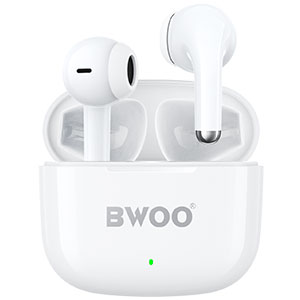


You open your charging case, expecting your TWS earbuds to be fully powered for the day-but instead, they're completely dead. Frustrating? Absolutely. Wireless earbuds not charging in the case is one of the most common issues users face, and it can be caused by anything from dirt buildup to battery degradation.
In this guide, we'll dive into the top reasons why earbuds fail to charge inside the case, how to fix charging issues, how to tell whether your earbuds are actually charging, and whether it's safe to charge the case without the earbuds inside.
Why Are My Earbuds Not Charging in the Case?
There are several possible reasons why your earbuds fail to charge properly:
1. Dirty charging contacts
Dust, sweat, earwax, or pocket lint can block the electrical connection between the earbuds and the charging pins in the case.
2. Misalignment inside the charging case
If the earbuds are not seated correctly, they won't make contact with the pins. Some models require a specific angle or click to engage charging.
3. Low battery in the charging case
If the charging case itself is out of power, it cannot send power to the earbuds-even if you insert the earbuds correctly.
4. Faulty or worn-out charging pins
Charging pins may become loose, bent, or corroded over time.
5. Outdated firmware or software glitches
Some wireless earbuds rely on firmware to manage charging behavior. Bugs or errors may prevent them from charging normally.
6. Battery degradation
Lithium batteries deteriorate with age. After several years, earbuds may no longer hold a charge or may fail to respond when placed in the case.
7. Incompatible or faulty charging cable / adapter
If the charging case is not receiving proper power due to an incompatible charger or a damaged cable, the earbuds may appear not to charge.
How Do I Fix Earbuds Not Charging in the Case?
Here are practical, effective troubleshooting methods you can try:
1. Clean the charging contacts
Use a dry cotton swab or a microfiber cloth
Gently wipe the metal contacts on both the earbuds and the charging case
Avoid using liquids that may damage the components
2. Re-seat the earbuds
Remove the earbuds and insert them again until you feel:
A magnetic pull
A soft click
A charging indicator light turning on
3. Charge the case first
Plug the charging case into a power source for at least 10-15 minutes before checking the earbuds again.
4. Try a different cable or adapter
Use the original cable if possible. If not, choose a certified cable and a standard 5V/1A charger.
5. Restart or reset the earbuds
Many TWS models allow a factory reset:
Refer to the brand's user manual
Follow the steps to reset pairing and charging settings
Resetting often resolves internal charging glitches.
6. Update the firmware (if applicable)
Some brands update charging performance via app-based firmware updates. Always keep your earbuds and companion app up to date.
7. Check for physical damage
Inspect:
Charging pins
Battery connectors
Hinge or magnetic latch
If anything is loose or broken, professional repair or replacement might be necessary.
How Do I Know If My Earbuds Are Charging?
Different brands use different indicators, but the most common signs include:
LED indicator on the earbuds
Solid or blinking light
Color changes (often red, orange, or white depending on the model)
LED lights on the charging case
The case may show:
Lighting up when earbuds are inserted
Battery level indicators
App-based battery reading
Some earbuds allow you to check charging status and battery percentage inside a companion app.
Vibration or sound feedback
A few models provide a short tone when they start charging.
If none of these indicators appear, the earbuds may not be charging.
Can I Charge the Case Without the Earbuds Inside?
Yes - it is completely safe to charge the case without the earbuds inside.
Most charging cases are designed to:
Charge independently
Supply power to earbuds only when they are inserted
Protect the batteries from overcharging
Charging the case alone does not affect the earbuds' battery health and is a normal practice.
Conclusion
Earbuds not charging in the case is a common but solvable problem. Most issues stem from dirty contacts, incorrect placement, low battery in the case, or minor software glitches. By cleaning the charging points, ensuring proper alignment, updating firmware, and checking your cables, you can restore normal charging in most situations.
If your earbuds remain unresponsive after troubleshooting, it may be a sign of deeper hardware damage or battery wear-especially in older earbuds. In that case, contacting the manufacturer or replacing the device may be the best solution.
Keeping your charging case clean, using proper charging accessories, and performing regular resets can help prevent charging problems in the future.
Related readings:
BWOO BO-OS02 Open-Ear Wireless Earbuds
Tips for Preventing Earbuds from Falling Down


