




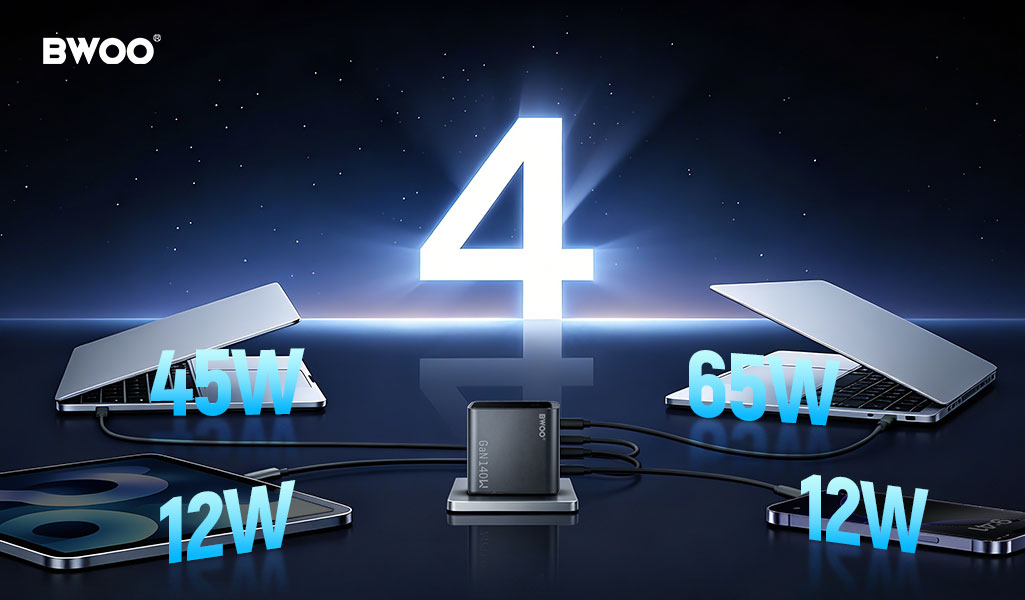
Why a 140W charger does not give every device 140W — understanding fixed vs. dynamic power allocation, the renegotiation problem, and how to choose the right multi-port charger.
1. The Multi-Port Charger Power Paradox
You buy a 140W multi-port GaN charger, plug in your 65W laptop, 25W phone, and 5W wireless earphones — expecting all three to charge at full speed simultaneously. Instead, your laptop charges slowly, your phone displays "slow charging," and you wonder if the charger is defective. It is not. The explanation lies in how multi-port chargers distribute power internally — and the answer reveals why the "total watts" number printed on the box is only half the story. According to product review analysis of mobile charging accessories, battery and charging performance complaints are consistently among the top drivers of negative reviews because marketing claims ("140W!") do not match user expectations of simultaneous full-speed charging.
2. Fixed vs. Dynamic Power Allocation: Two Different Design Philosophies
Fixed Power Allocation: Predictable but Inflexible
Fixed allocation chargers assign a pre-determined maximum wattage to each port, regardless of what is actually plugged in. For example, a 100W 2-port charger with fixed allocation might assign: Port 1 = 65W max, Port 2 = 35W max — always, whether Port 2 is used or not. If you plug a 65W laptop into Port 2, it only gets 35W because that is the fixed ceiling for that port, even though total charger capacity (100W) is sufficient. The advantage of fixed allocation is predictability: the behavior never changes, and there is no renegotiation when devices are plugged or unplugged. The disadvantage is wasted capacity: unused wattage on an idle port cannot be redirected to an active port. Fixed allocation is common in budget and mid-range multi-port chargers and is the most frequent cause of the "why is my laptop charging slowly on a high-watt charger" complaint.
Intelligent Dynamic Power Allocation: Flexible but Complex
Dynamic power allocation (DPA) chargers continuously monitor what is plugged into each port and redistribute total available power accordingly. When a laptop is the only device connected, it can draw the full 140W. When a phone is added, the charger renegotiates with both devices and allocates power based on priority rules, typically: USB-C1 highest priority → USB-C2 second → USB-C3 third → USB-A lowest. The advantage is maximum utilization of charger capacity — unused wattage is always available to the highest-priority device. The disadvantage is the renegotiation event: when a new device is plugged in or an existing one is unplugged, the charger must briefly (typically 0.5-3 seconds) drop power to all ports, renegotiate the USB PD contracts with all connected devices, and resume at new power levels. This brief interruption is the reason your laptop screen dims for a second when you plug in your phone — it is not a fault, it is the charger doing a power redistribution handshake.
3. Real-World Scenario: The 140W Charger with Three Devices
Let us walk through a concrete scenario to see how power allocation works in practice. You have a 140W 4-port GaN charger (3× USB-C, 1× USB-A) with intelligent dynamic allocation and a priority order of C1 > C2 > C3 > A. Your devices: MacBook Pro (needs 65W for fast charging), iPhone (needs 25W for fast charging), and AirPods case (needs 5W). Total demand: 65 + 25 + 5 = 95W. The charger has 140W total capacity — more than enough in theory. The table below shows how actual allocation works across different plug-in scenarios.
Scenario | C1 (Highest Priority) | C2 | C3 | Total Used / 140W |
Only MacBook on C1 | 65W (full speed) | — | — | 65W / 140W |
MacBook C1 + iPhone C2 | 65W (full speed) | 25W (full speed) | — | 90W / 140W |
MacBook C1 + iPhone C2 + AirPods C3 | 65W (full speed) | 25W (full speed) | 5W (full speed) | 95W / 140W |
MacBook C1 + MacBook C2 | 65W (full speed) | 45W (throttled; total 110W) | — | 110W / 140W |
MacBook C1 + MacBook C2 + iPhone C3 | 65W (full speed) | 35W (further throttled) | 15W (throttled) | 115W / 140W |
Notice that in no scenario does Power Delivery fail to distribute power — but when two laptops compete for the same pool, both are throttled below their individual maximums. The total (110W or 115W) is still within the 140W charger capacity, but the allocation rules (C1 gets priority up to 65W, remainder distributes to C2/C3) mean that the second laptop never reaches its full 65W. This is the core insight: a multi-port charger total wattage tells you the pool size; the allocation rules tell you what each port actually gets.
4. The Renegotiation Problem: Why Plugging In Devices Causes Brief Disconnects
USB Power Delivery (USB PD) is a negotiated protocol, not a simple "dump power onto the line" system. When a device connects, it communicates with the charger via the CC (Configuration Channel) pin to negotiate voltage and current. The charger then configures its internal DC-DC converter to the agreed voltage. When a second device connects, the charger must:
Drop power to all ports to a safe baseline (typically 5V)
Renegotiate with all connected devices to determine new power requirements
Allocate total available power to each port according to priority rules
Ramp each port back up to its newly assigned voltage and current
This process takes 0.5-3 seconds for quality chargers. During this window, your laptop briefly switches to battery power and your phone screen may flash off/on as the charging state toggles. This is normal behavior for all dynamic allocation chargers — it is the cost of flexibility. Chargers with fixed allocation avoid this behavior because each port is pre-allocated and never needs to renegotiate when other ports change state.
5. How to Choose the Right Multi-Port Charger for Your Setup
Calculate your simultaneous charging demand: Add the maximum PD power draw of every device you regularly charge at once. Example: Laptop 65W + Phone 25W + Watch 5W + Earbuds 5W = 100W. This is your minimum required charger capacity.
Apply the 1.3× safety margin: Choose a charger rated at least 1.3× your calculated demand. For 100W demand, a 130W+ charger ensures headroom for power spikes (laptops can momentarily draw 80-100W during burst loads even if their sustained draw is 65W) and for future devices with higher charging speeds. Example: 100W × 1.3 = 130W minimum — choose a 140W charger.
Prioritize dynamic allocation: If you frequently plug and unplug devices throughout the day, dynamic power allocation ensures unused capacity is always available to your highest-priority device. If you have a static setup (all devices plugged in once and left for hours), either allocation type works.
Check the port priority labeling: Most chargers with dynamic allocation label their USB-C ports in order of priority. Always plug your highest-power device (laptop) into the C1 port. The difference between plugging your laptop into C1 vs. C3 can be the difference between 65W full-speed charging and 20W trickle charging.
Consider a smart display: A charger with a real-time power readout per port eliminates the guesswork. You can see exactly how many watts each device is drawing and immediately spot if a device is charging slower than expected because of port misassignment or cable quality issues.
6. BWOO CDA267: Intelligent Charging with No Guesswork
For consumers and professionals who want multi-device charging without the ambiguity, the BWOO CDA267 140W 4-Port GaN smart display charger directly addresses the power allocation transparency problem. The CDA267 features intelligent dynamic power allocation across three USB-C ports and one USB-A port, with a built-in real-time digital display that shows the actual wattage being delivered to each active port — not the theoretical maximum, but the live, negotiated power being drawn. This display eliminates the most common multi-port charger frustration: wondering whether your laptop is getting 65W or 20W without installing monitoring software. If the display shows your laptop drawing only 30W on C3, you can physically swap it to C1 and immediately see the wattage jump to 65W — instant feedback that would otherwise require a USB power meter. The CDA267 uses advanced GaN (Gallium Nitride) technology, which generates significantly less heat than silicon-based chargers at the same power density, maintaining efficiency across the 140W total output. The compact GaN design also means the CDA267 fits in a travel bag alongside your laptop — a 140W silicon charger of equivalent output would be at least twice the size and weight. For anyone managing multiple USB-C devices daily — laptop, phone, tablet, earbuds, power bank — the CDA267 replaces an entire drawer of single-port chargers with one intelligent hub that tells you exactly what it is doing.


