

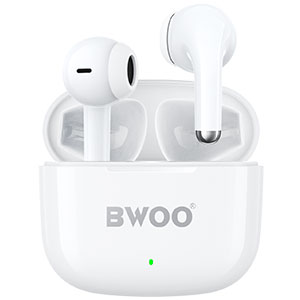



In today's fast-evolving tech world, headphones are no longer just about sound quality or safety - how users interact with them has become a major factor in purchasing decisions. From touch panels to voice commands, the control method greatly affects user satisfaction. For headphone manufacturers, delivering an intuitive and seamless experience is essential.
This article explores the most common headphone control methods, their advantages and drawbacks, and how these methods can be improved to enhance the overall user experience.
Common Headphone Control Methods
Physical Buttons
Traditional wired and wireless headphones often use physical buttons for functions like volume adjustment, play/pause, and answering calls.
Pros:
Reliable and responsive even when wearing gloves or during workouts.
Easy to locate by touch without needing visual feedback.
Cons:
Buttons may wear out over time.
Can create clicking sounds or discomfort when pressed.
Limited space restricts complex control functions.
Touch Controls
Found on most modern wireless earbuds and over-ear models, touch controls allow users to tap or swipe to perform actions.
Pros:
Sleek, button-free design enhances aesthetics.
Allows for more gestures (tap, double tap, long press) for advanced functions.
Cons:
May trigger accidental touches.
Difficult to operate in rainy conditions or when wearing gloves.
Response sensitivity varies among models.
Voice Commands
Many smart headphones now support voice assistants like Siri, Google Assistant, or Alexa for hands-free control.
Pros:
Enables full hands-free operation.
Convenient for multitasking and accessibility.
Cons:
Requires stable internet connectivity for optimal performance.
May not recognize accents or noisy environments.
Some users are concerned about privacy.
App-Based Controls
Headphone companion apps allow users to customize settings, equalizer profiles, and control gestures.
Pros:
Offers deep personalization and firmware updates.
Enhances overall product usability.
Cons:
Requires smartphone access.
Adds complexity for users preferring simple, plug-and-play devices.
Improving User Experience Through Better Control Design
Enhancing headphone control isn't just about adding more features - it's about making every interaction effortless and intuitive. Here are several key strategies:
Ergonomic Design
Controls should be placed where the fingers naturally rest, reducing accidental touches and improving accessibility.
Adaptive Sensitivity
Touch panels can benefit from adjustable sensitivity settings to suit different user preferences.
Multi-Modal Control
Combining touch, voice, and app-based controls gives users flexibility to choose their preferred method.
User Feedback
Haptic vibrations, LED indicators, or auditory tones can confirm actions, minimizing uncertainty.
Context-Aware Functionality
Smart sensors that detect whether headphones are worn can automatically pause playback or activate specific modes.
Recommended Model: BWOO BO-BW589
If you're looking for a headphone that strikes the perfect balance between advanced control and premium performance, the BO-BW589 is a top choice.
This model features:
Active Noise Cancellation (ANC) for immersive listening.
Long-lasting battery life for extended sessions.
Intuitive touch control for smooth transitions between Transparency Mode and Immersive Listening Mode.
Designed with both convenience and performance in mind, the BO-BW589 offers users a seamless and enjoyable experience in every environment.
Conclusion
As headphone technology continues to advance, control methods will remain a key differentiator in user experience. Whether it's physical buttons, touch sensors, or smart voice assistants, the goal is always the same - to make interaction natural, responsive, and satisfying.
Brands like BWOO are leading this transformation by creating products that combine intuitive design with superior sound performance.
Related readings:
How Do Wireless Earphones Work?


